






Search
The Search operation (SEARCH) returns the products that appear on an Amazon search results page, in the order Amazon ranks them. You send either a keyword or the url of an Amazon search results page, plus the marketplace domain.
When to use
- Track where your products rank for a keyword, and how the ranking changes over time.
- Monitor which competitors and sponsored listings appear for the search terms you care about.
- Collect the product list for a niche or category, then fetch full data for each ASIN with the Detail operation.
- Research keywords and build SEO or listing optimization tools by comparing prices, ratings and sponsored placements across search terms.
- Run large keyword lists with the Bulk API instead of one request per keyword.
What the response includes
- Ranked product listings (
search_results): position, ASIN, title, brand, link and thumbnail image ID. - Price data: current price, other listed prices such as the list price, and the lowest price from other offers.
- Ratings and review counts, recent purchase activity ("bought in past month") and color variant counts.
- Listing flags:
is_sponsoredfor ads andis_primefor Prime eligibility. - The filters Amazon shows in the sidebar (
refinements), such as brand, department, price and customer reviews, with the IDs you can send back in therefinementsparameter. - Related searches and the delivery location used for the results.
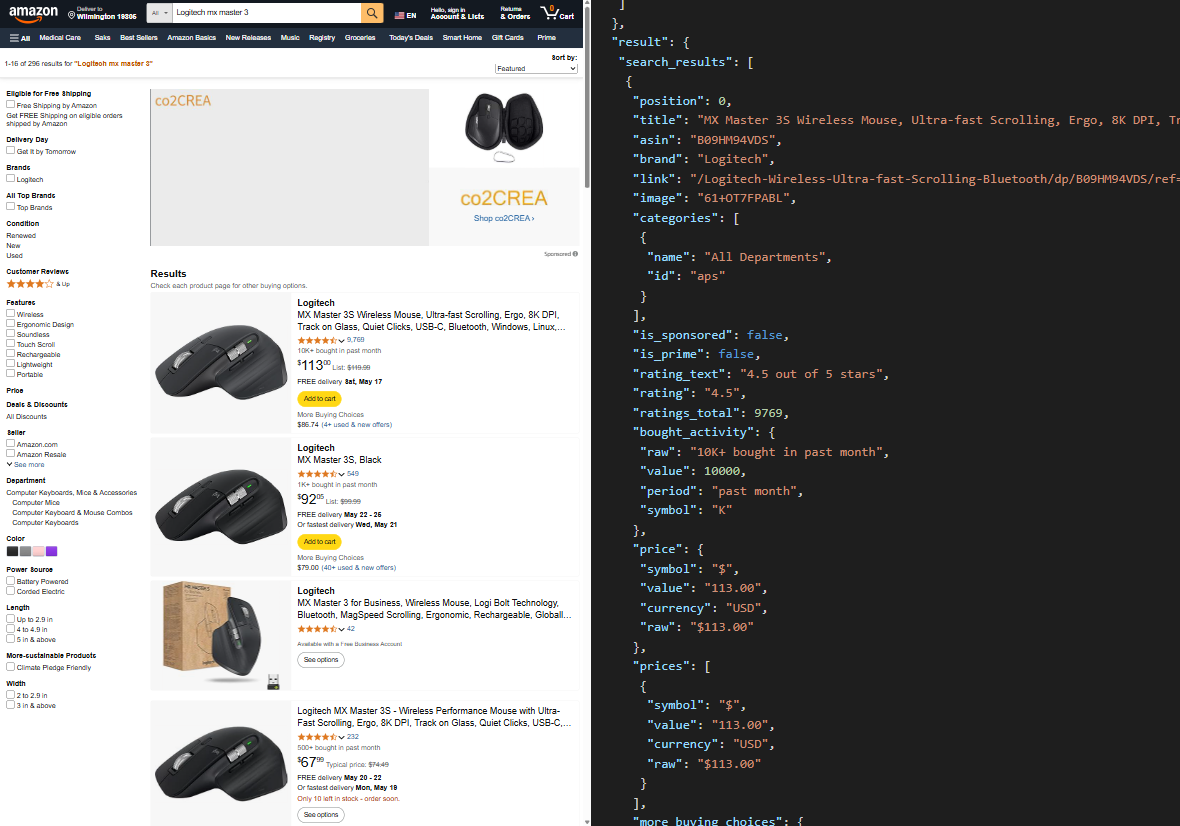
See the Search response for every field.
Credit cost
1 credit per results page (max_page - min_page + 1), with at most 5 pages (5 credits) per request. See Credit Consumption.