






Address Management
Amazon shows different prices, availability and delivery estimates depending on the delivery location. Set an address on your request so the response reflects what a shopper at that location sees. Setting an address is optional: without one, Easyparser uses the default address for the request's domain.
Before you begin
Operations that support an address
| Supported | Not supported |
|---|---|
DETAIL, OFFER, SEARCH, SELLER_PRODUCTS | SIMILAR_PRODUCTS, BEST_SELLERS_RANK, PACKAGE_DIMENSION, SALES_ANALYSIS_HISTORY, PRODUCT_LOOKUP, SELLER_PROFILE, SELLER_FEEDBACK |
Do not send address fields to the operations in the second column. They do not apply an address, and most of them reject an unknown address_id: BEST_SELLERS_RANK, PACKAGE_DIMENSION, PRODUCT_LOOKUP, SELLER_PROFILE and SELLER_FEEDBACK return HTTP 400 with [!] Address not found or incompatible. for an address_id that does not exist, while SALES_ANALYSIS_HISTORY and SIMILAR_PRODUCTS ignore it.
Choose a method
| Method | Parameters | Setup | Best for |
|---|---|---|---|
| Pre-registered address | address_id | Create the address once in the web app | Locations you reuse across many requests |
| Inline address | zip_code, city, district, country_code | None | One-off or dynamic locations |
Both methods give the same result, and the applied address is always returned in request_info.address. Addresses are specific to a domain: an address created for .com cannot be used on .de, so the request's domain must match the address.
Create a pre-registered address
You manage pre-registered addresses on the Addresses page of the web app. Each address gets a unique numeric ID that you send as address_id. The number of addresses you can create depends on your plan (see pricing).
Open the Addresses page
Go to app.easyparser.com/addresses and click Add Address. If you have no addresses yet, the button is at the bottom of the empty-state message. The Add a New Address form opens.
Fill in the address
- Optional: enter a Title so you can recognize the address later.
- Platform is fixed to
AMZ. - Under Store, choose the Amazon domain, for example
amazon.com. - If the domain offers more than one input type, choose one: Zipcode, Country, City, City/Area or Zipcode and City. The options depend on the domain (see Per-domain reference).
- Enter the values, for example the ZIP code
10001onamazon.com. - Click Add Address.
Wait until the address is Active
The new address appears in the list with its ID, domain, address type, value and Status. Only addresses with the status Active can be used in requests.
Status Meaning Preparing The address is being validated. This usually takes a short time. Active The address is ready to use. Inactive You deactivated the address. Select Activate to use it again. Renewing The address is being renewed. Wait until it is Active again. Error The entered address may be wrong. Check the values, then add a corrected address or select Activate to validate it again. Manage the address
Use the Actions menu at the right of each row to Inactivate, Activate or Delete the address. Activate is available for Inactive and Error addresses and sends the address back to Preparing. A deleted address cannot be used again; requests that still send its ID return an error.
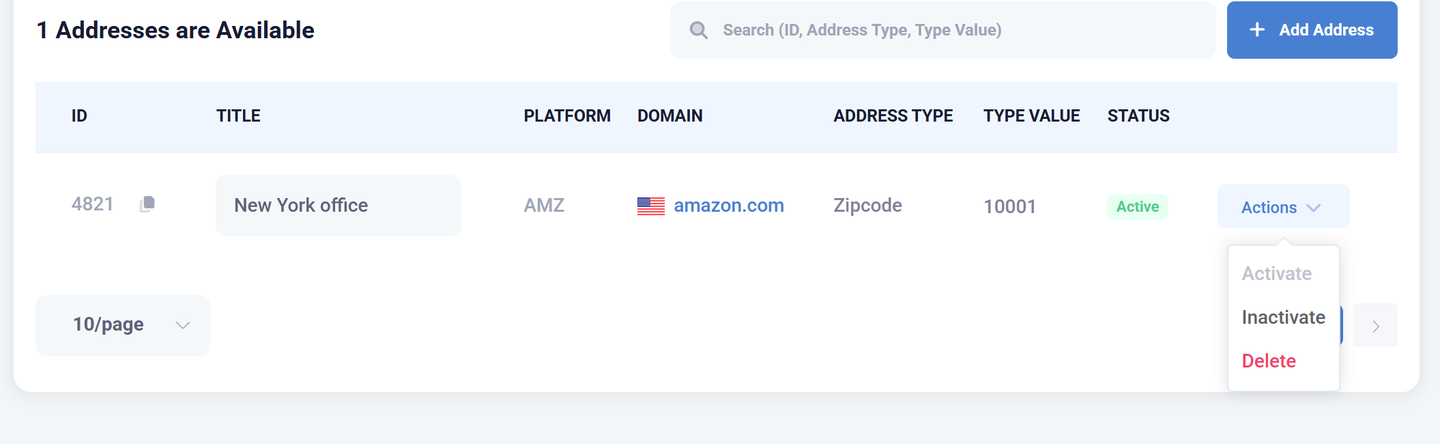
Row actions on the Addresses page Copy the address ID
Copy the value in the ID column and send it as
address_id. In the Playground, the Address ID (Zipcode) dropdown lists your addresses for the selected domain by ZIP code and sends the matching ID, for example ZIP code10001maps to ID4821.
Set an address inline
Send the address fields directly in the request. No web app setup and no address_id are needed. The address determines what Amazon shows for that request, exactly as a pre-registered address does.
Inline parameters
| Parameter | Type | Required | Description |
|---|---|---|---|
zip_code | string | No | Inline delivery address: zip or postal code. Join two-part codes with a comma, for example N0E,1Y0. |
city | string | No | Inline delivery address: city. Required with zip_code on .com.au and with district on .ae; send it alone on .sa and .eg. Do not send it on other domains. |
district | string | No | Inline delivery address: area within city. Only on .ae, together with city. |
country_code | string | No | Destination country for cross-border delivery, as an ISO 3166-1 alpha-2 code, for example GB. Full country names are also accepted. |
When inline fields match an address that already exists for that domain, Easyparser reuses it instead of creating a new one. Repeated requests to the same location do not count again against your plan's address limit.
Per-domain reference
Each Amazon marketplace offers a different address input in its delivery-location selector. Use the parameters listed for the request's domain.
domain | Parameters | Format and example |
|---|---|---|
 .com | zip_code | 5 digits, for example 39204 |
 .co.uk | zip_code | One value, not comma-split, for example SW1A 1AA |
 .de | zip_code | For example 08223 |
 .es | zip_code | For example 28008 |
 .fr | zip_code | For example 75002 |
 .it | zip_code | For example 20123 |
 .com.mx | zip_code | For example 11000 |
 .sg | zip_code | For example 238859 |
 .com.tr | zip_code | For example 34122 |
 .in | zip_code | For example 400001 |
 .ca | zip_code | Two parts, comma-separated, for example N0E,1Y0 |
 .com.br | zip_code | Two parts, comma-separated, for example 01310,100 |
 .co.jp | zip_code | Two parts, comma-separated, for example 241,0014 |
 .pl | zip_code | Two parts, comma-separated, for example 00,902 |
 .se | zip_code | Two parts, comma-separated, for example 421,37 |
 .ie | zip_code | A valid Eircode, for example P67 YR53 |
 .com.au | zip_code and city | For example zip_code=3101&city=KEW |
 .ae | city and district | For example city=Abu Dhabi&district=ADCO Compound |
 .sa | city | A city from Amazon's delivery-city list, for example Riyadh |
 .eg | city | A city from Amazon's delivery-city list |
 .nl | country_code | Only NL or BE |
 .com.be | None | The address cannot be set on this domain |
Domains that also offer a Country option accept country_code for cross-border delivery (see Cross-border delivery).
On .com.au, Amazon shows a list of cities for each ZIP code; send one of them as city. On .sa and .eg, the city must be one of Amazon's fixed delivery cities, for example Riyadh, Jeddah or Dammam on .sa. Amazon defines these lists and may change them, so check the delivery-location selector on the marketplace for the current set.
Cross-border delivery
country_code simulates shipping to a country other than the domain's home country, like the "deliver to another country" option in Amazon's own selector. Each domain accepts only the destination countries Amazon offers for that marketplace. Examples from the web app's Country list:
domain | Destinations in the web app |
|---|---|
.ae | BH, KW, OM, SA |
.sg | MY |
.com.au | NZ |
.nl | NL, BE |
.com | A broad international list |
In the web app, the Country option with a destination list is available on .com, .co.uk, .de, .fr, .it, .es, .nl, .ae, .co.jp, .sg and .com.au. Amazon controls these lists and can change them, so check the delivery-location selector on the marketplace for the current set. A country the marketplace does not offer is not applied as a cross-border address.
Using it in requests
Real-Time API with an inline address
Add the address fields as query parameters.
curl --get "https://realtime.easyparser.com/v1/request" \ --data-urlencode "api_key=YOUR_API_KEY" \ --data-urlencode "platform=AMZ" \ --data-urlencode "operation=DETAIL" \ --data-urlencode "domain=.com" \ --data-urlencode "asin=B0CJB6V2L5" \ --data-urlencode "zip_code=39204"import requests
params = { "api_key": "YOUR_API_KEY", "platform": "AMZ", "operation": "DETAIL", "domain": ".com", "asin": "B0CJB6V2L5", "zip_code": "39204",}
response = requests.get("https://realtime.easyparser.com/v1/request", params=params)print(response.json())const params = new URLSearchParams({ api_key: "YOUR_API_KEY", platform: "AMZ", operation: "DETAIL", domain: ".com", asin: "B0CJB6V2L5", zip_code: "39204",});
const response = await fetch(`https://realtime.easyparser.com/v1/request?${params}`);const data = await response.json();console.log(data);GET /v1/request?api_key=YOUR_API_KEY&platform=AMZ&operation=DETAIL&domain=.com&asin=B0CJB6V2L5&zip_code=39204 HTTP/1.1Host: realtime.easyparser.com<?php$params = [ 'api_key' => 'YOUR_API_KEY', 'platform' => 'AMZ', 'operation' => 'DETAIL', 'domain' => '.com', 'asin' => 'B0CJB6V2L5', 'zip_code' => '39204',];
$url = 'https://realtime.easyparser.com/v1/request?' . http_build_query($params);$response = file_get_contents($url);$data = json_decode($response, true);print_r($data);package main
import ( "fmt" "io" "net/http" "net/url")
func main() { params := url.Values{} params.Add("api_key", "YOUR_API_KEY") params.Add("platform", "AMZ") params.Add("operation", "DETAIL") params.Add("domain", ".com") params.Add("asin", "B0CJB6V2L5") params.Add("zip_code", "39204")
resp, err := http.Get("https://realtime.easyparser.com/v1/request?" + params.Encode()) if err != nil { panic(err) } defer resp.Body.Close()
body, _ := io.ReadAll(resp.Body) fmt.Println(string(body))}using System;using System.Collections.Generic;using System.Linq;using System.Net.Http;
var parameters = new Dictionary<string, string>{ ["api_key"] = "YOUR_API_KEY", ["platform"] = "AMZ", ["operation"] = "DETAIL", ["domain"] = ".com", ["asin"] = "B0CJB6V2L5", ["zip_code"] = "39204",};
var query = string.Join("&", parameters.Select(p => $"{Uri.EscapeDataString(p.Key)}={Uri.EscapeDataString(p.Value)}"));
using var client = new HttpClient();var response = await client.GetStringAsync($"https://realtime.easyparser.com/v1/request?{query}");Console.WriteLine(response);import java.net.URI;import java.net.URLEncoder;import java.net.http.HttpClient;import java.net.http.HttpRequest;import java.net.http.HttpResponse;import java.nio.charset.StandardCharsets;import java.util.LinkedHashMap;import java.util.Map;import java.util.stream.Collectors;
public class EasyparserRequest { public static void main(String[] args) throws Exception { Map<String, String> params = new LinkedHashMap<>(); params.put("api_key", "YOUR_API_KEY"); params.put("platform", "AMZ"); params.put("operation", "DETAIL"); params.put("domain", ".com"); params.put("asin", "B0CJB6V2L5"); params.put("zip_code", "39204");
String query = params.entrySet().stream() .map(e -> URLEncoder.encode(e.getKey(), StandardCharsets.UTF_8) + "=" + URLEncoder.encode(e.getValue(), StandardCharsets.UTF_8)) .collect(Collectors.joining("&"));
HttpRequest request = HttpRequest.newBuilder() .uri(URI.create("https://realtime.easyparser.com/v1/request?" + query)) .GET() .build();
HttpResponse<String> response = HttpClient.newHttpClient() .send(request, HttpResponse.BodyHandlers.ofString()); System.out.println(response.body()); }}Real-Time API with address_id
Add address_id as a query parameter. Replace 722 with the ID of one of your Active addresses for the same domain.
curl --location 'https://realtime.easyparser.com/v1/request?api_key=YOUR_API_KEY&platform=AMZ&operation=DETAIL&domain=.com&asin=B0CJB6V2L5&address_id=722'Bulk API
In a Bulk Service Request, address_id goes at the root of each group object, as an integer. Inline address fields go inside payload, next to the input array.
curl --location 'https://bulk.easyparser.com/v1/bulk' \--header 'api-key: YOUR_API_KEY' \--header 'Content-Type: application/json' \--data '[ { "platform": "AMZ", "operation": "DETAIL", "domain": ".com", "address_id": 722, "payload": { "asins": ["B0CJB6V2L5"] }, "callback_url": "https://example.com/easyparser/webhook" }]'[ { "platform": "AMZ", "operation": "DETAIL", "domain": ".com", "payload": { "asins": ["B0CJB6V2L5"], "zip_code": "39204" }, "callback_url": "https://example.com/easyparser/webhook" }]Check the applied address
Every Real-Time response returns the address that was actually used in request_info.address (see the response envelope). Without an address in the request, this is the domain's default address.
"address": { "city": null, "district": null, "country_code": null, "zipCode": ["39204"]}zipCode is an array. A two-part postal code sent as 01310,100 comes back as ["01310", "100"].
Limitations
- Timeout: Real-Time requests time out after 15 seconds. With inline address fields, the address is provisioned during the request and the timeout increases to 45 seconds. Requests with
address_idare not affected. Set your client timeout to at least 60 seconds. Bulk API queries follow the Bulk processing timeout of 5 minutes per query instead (see Bulk API overview). - Operations: only
DETAIL,OFFER,SEARCHandSELLER_PRODUCTSsupport an address. - Domains: an address belongs to one domain. On
.com.bethe address cannot be set by any method. - Address limit: the number of addresses depends on your plan. When the limit is reached, adding an address fails with
MSG1014.
Address errors
| Code | Message | Cause |
|---|---|---|
MSG1009, MSG1013 | Address not found | The address for the given address_id could not be found. Check the ID and the request's domain. |
MSG1016 | There is no such address or it has been deleted before. | The address was deleted. |
HTTP 400 | [!] Address not found or incompatible. | The address_id does not exist or does not fit the request, for example on an operation that does not support an address. |
MSG1014 | Maximum address count reached | Your plan's address limit is reached. |